Smarter Trading. Simplified Management.
Managing multiple MT5 accounts? Connect your accounts, copy trades across them, monitor equity, and receive real-time alerts. All from one centralized platform.
Built for multi-account traders, account managers, and trading businesses.
- Account Management
- Trade Copying
- Equity Monitoring
- Real-Time Alerts
Your Trading Operation
- AAccount A1.0×
- BAccount B0.5×
- CAccount CFixed
Illustrative setup. Your own accounts and rules are yours to configure.
Is Social Copier Right for You?
Start with what you’re trying to accomplish.
“I manage multiple trading accounts”
Keep your MT5 accounts organized, monitor performance, and manage trading activity from one centralized platform.
Explore Account Manager“I want to copy trades”
Distribute trades from a lead account to multiple follower accounts using configurable copying rules.
Explore Trade Copier“I want to protect my equity”
Monitor account equity, configure targets and drawdown rules, and receive alerts when important conditions are reached.
Explore Equity Monitor“I need all three”
Manage accounts, copy trades, monitor equity, and receive real-time alerts from one platform.
Explore the Platform
Managing Multiple Accounts Gets Complicated.
When you’re managing more than one trading account, repetitive tasks can quickly become difficult to control.
Doing it by hand
- MT5 Account 1Manual trade
- MT5 Account 2Manual trade
- MT5 Account 3Manual trade
- Switch terminals
- Check equity
- Review trades
- Repeat
- Manual
- Repetitive
- Time-consuming
- Hard to monitor
One Centralized Trading Workflow.
Set it up once. Your trades reach every connected account, equity is watched for you, and you hear about it the moment something matters.
Lead Account
The account you trade
Trade Copier
Distributes your trades
Follower Accounts
Each with its own rules
Equity Monitor
Targets and limits
- Target
- $25,000
- Limit
- -8%
Email Alerts
The moment it matters
You configure it once. After that, the same trade reaches every account you chose, at the size you chose, and the monitor keeps watch whether you’re at the desk or not.
Does This Sound Familiar?
If one of these is your day, there’s a tool for it.
I manage multiple MT5 accounts.
Account Manager
Centralize account information, performance, positions, and trading activity.
I place the same trades across several accounts.
Trade Copier
Configure lead and follower relationships and distribute supported trades according to your rules.
I need to stop watching equity manually.
Equity Monitor
Set equity targets and protection rules and receive alerts when configured conditions are reached.
I don't want to constantly check everything.
Real-Time Alerts
Receive email notifications when important account, trade, or equity events occur.
Built for the Way You Trade.
One platform. Different trading operations.
- 01
Individual Traders
Managing multiple personal trading accounts?
Keep accounts organized and reduce repetitive work.
- 02
Multi-Account Traders
Trading the same strategy across several accounts?
Configure trade distribution instead of repeating the same process manually.
- 03
Account Managers
Managing multiple accounts or strategies?
Centralize visibility and operational control.
- 04
Trading Businesses
Running a larger trading operation?
Bring account management, trade distribution, equity monitoring, and alerts into one structured workflow.
- Accounts
- Copying
- Equity
- Everything
- 01Configure your setup
- 02Automate
- 03Monitor
What Do You Need to Manage?
Pick the one that matches your situation, or take the whole workflow.
Manage Every MT5 Account From One Place.
Manage MT5 accounts independently of any broker and get a clear, real-time view of your trading operation.
See Everything at a Glance
View an overview of your accounts, real-time open trades, daily, weekly and monthly totals, equity, balance, and P/L from one place.
Swipe the screen sideways to see the full interface.
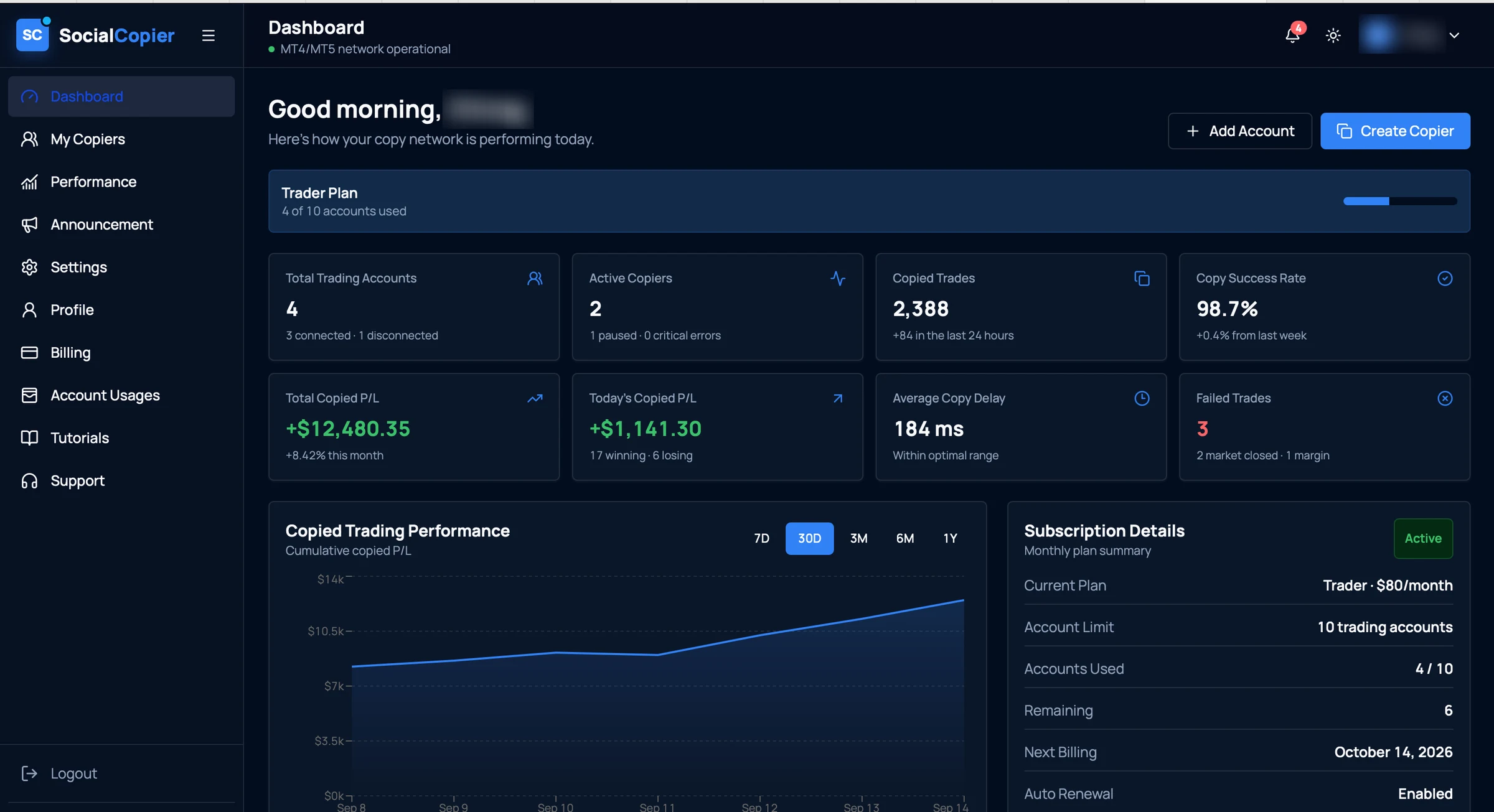
- 01Account capacityHow many of your plan's trading accounts are in use.
- 02Connected accountsEvery account you've added, and which of them are currently connected.
- 03Copy success rateThe share of copy attempts that completed, with the change on last week.
- 04Copied P/LTotal and same-day copied profit and loss, with winners against losers.
- 05Copy healthAverage copy delay and any trades that failed, with the reason.
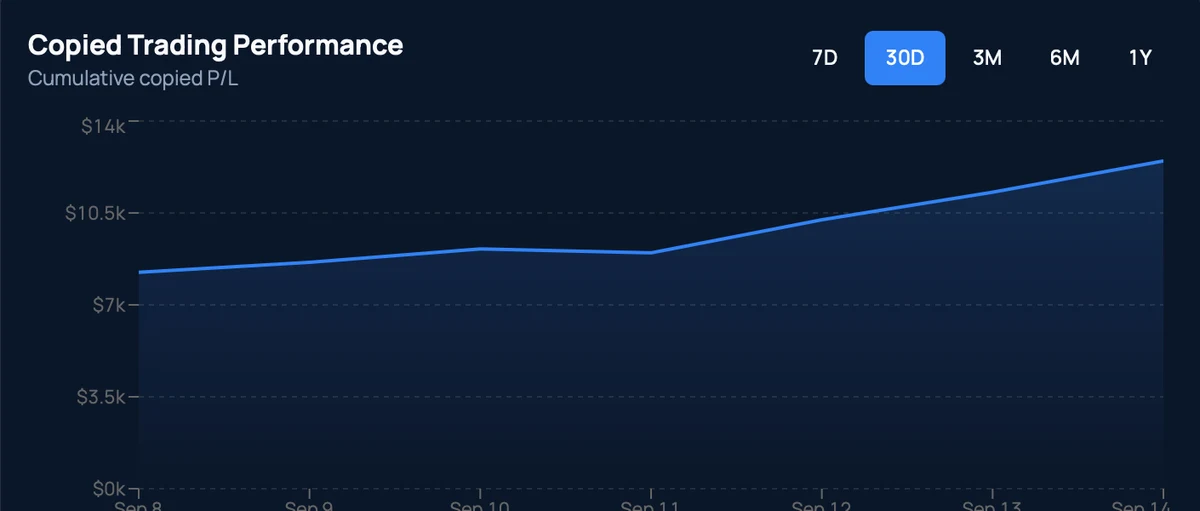
- 06Performance over timeCumulative copied P/L across 7 days to 1 year.
A real screen from the application. The account holder's name is blurred; figures are that account's own.
- Concept
Manage Accounts Independently
Accounts are managed from one workspace rather than one terminal each, across different brokers.
- MT5Account AConnected
- MT5Account BConnected
- MT5Account CConnected
- From the app
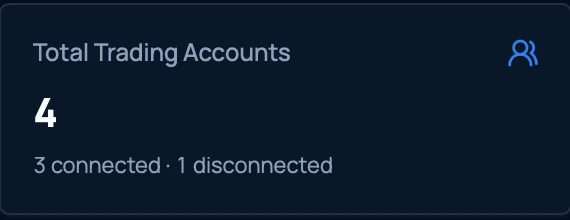
Everything at a Glance
How many accounts you have and how many are connected, without opening each one.
- Concept
Real-Time Open Trades
Review the positions currently open across your accounts in one list.
Open tradesLive- XAUUSDBUY0.50
- EURUSDSELL1.00
- GBPUSDBUY0.25
- From the app
Daily. Weekly. Monthly.
Switch the performance view between 7 days, 30 days, 3 months, 6 months and a year.
- From the app
Know Your Numbers Instantly
Total and same-day copied P/L, with how many positions won and how many lost.

- From the app
Watch Execution Health
Average copy delay and any failed trades, each with the reason it failed.

One Trade. Multiple Accounts.
Distribute trading activity from a lead account to connected follower accounts using configurable copying rules.
Control how trades are distributed. See what was copied. Monitor every copier relationship.
3 copiers across 4 accounts · 2 active · 1 paused
Monitor Equity. Define Your Rules. Stay Informed.
Monitor account equity and configure conditions that can trigger supported actions and notifications.
Three steps, once you’ve set it up
The diagrams below show how equity rules behave. They are illustrations of the design, not screens from the application.
Equity is watched against the levels you set.
A level you defined is reached: a target above, or a limit below.
A target is a level you choose. The monitor watches for it.
The response you configured for that rule runs.
- Alert only
- Alert + disable copier
- Alert + disable + close
Equity condition reached
Sent to your inbox with the account and the rule that fired.
- Concept
Equity Targets
Set a level you want an account to reach, and have the monitor watch for it.
Current equityTargetA target is a level you choose. The monitor watches for it.
- Concept
Drawdown Monitoring
Set a protective level below, so a falling account reaches a line you chose rather than one you didn't.
TargetProtection level - Concept
Automated Actions
When a condition is met the rule fires, and the response you picked for it runs.
- 1Condition reached
- 2Rule triggered
- 3Action taken
- Concept
Notifications
An email tells you which account it was and which rule fired, without you checking.
Equity condition reached
Sent to your inbox with the account and the rule that fired.
Know When It Matters.
You shouldn’t have to constantly check your platform to know what’s happening.
Receive timely email notifications for important events across your accounts, trades, and equity rules.
- Equity Alertjust now
Account Alpha has reached its configured equity threshold.
- Trade Copier2 min ago
Trade copied successfully to 3 follower accounts.
- Account Status18 min ago
Account connection requires attention.
- Risk Alert1 hr ago
Configured drawdown threshold has been reached.
From Setup to Automation in Minutes.
01Connect
Connect supported MT5 trading accounts.
02Configure
Set account relationships, copying preferences, and equity rules.
03Activate
Enable your configured workflows.
04Monitor
Stay informed through the platform and email alerts.
Built for Traders Who Think Beyond One Account.
Less Manual Work
Reduce repetitive account-management tasks.
More Visibility
Get a centralized view of accounts, trades, equity, and performance.
More Control
Configure different rules for different accounts.
Automated Protection
Use equity-based conditions to trigger supported actions.
Flexible Trade Distribution
Adjust position sizing and copying preferences per account.
Ready to Scale
Choose a plan that matches the number of accounts you manage.
Simple Pricing. Powerful Features.
Choose the plan that fits your trading operation.
Standard
Up to 2
MT5 accounts
A simple starting point for traders managing a small number of accounts.
- Up to 2 MT5 accounts
- Account Manager
- Trade Copier
- Equity Monitor
- Real-time email alerts
Plus
Up to 5
MT5 accounts
More capacity for traders managing multiple accounts from one platform.
- Up to 5 MT5 accounts
- Account Manager
- Trade Copier
- Equity Monitor
- Real-time email alerts
- Most Popular
Pro
Up to 10
MT5 accounts
Built for active traders and account managers operating across a larger account setup.
- Up to 10 MT5 accounts
- Account Manager
- Trade Copier
- Equity Monitor
- Real-time email alerts
Premium
Up to 20
MT5 accounts
Maximum account capacity for advanced multi-account trading operations.
- Up to 20 MT5 accounts
- Account Manager
- Trade Copier
- Equity Monitor
- Real-time email alerts
Every plan includes the Account Manager, Trade Copier, Equity Monitor, and real-time email alerts. Plans differ only by account capacity.
Every Plan, Side by Side.
The same toolset on every plan. Pick the account capacity you need.
Swipe the table sideways to compare all four plans.
| Feature | Standard | Plus | ProMost Popular | Premium |
|---|---|---|---|---|
| MT5 Accounts | Up to 2 | Up to 5 | Up to 10 | Up to 20 |
| Account Manager | Included | Included | Included | Included |
| Trade Copier | Included | Included | Included | Included |
| Equity Monitor | Included | Included | Included | Included |
| Real-time Email Alerts | Included | Included | Included | Included |
Need more than 20 accounts?
Contact our team to discuss options for larger trading operations.
Built With Control and Security in Mind.
Your trading infrastructure requires careful handling.
We design the platform around controlled access, secure account connections, and clear operational visibility.
Secure Connections
Account connections are designed with security and access control in mind.
Controlled Access
Keep trading accounts and configurations organized.
Operational Visibility
Know what's connected, what's active, and what's happening.
Automated Monitoring
Keep track of account equity and configured conditions.
We describe how the platform is designed. We don’t claim certifications or compliance standards we haven’t completed.
Frequently Asked Questions
Everything about the platform, plans, and how the tools fit together.
It’s a centralized trading-management platform designed to help you manage MT5 accounts, copy trades, monitor equity, review trading activity, and receive real-time email alerts.
Your Trading Operation Starts Here.
Stop managing every account manually.
Bring account management, trade copying, equity monitoring, performance visibility, and real-time alerts together in one powerful platform.