Everything the Platform Does.
Three tools, one workspace: a central view of every connected account, a copier that distributes one strategy across many of them, and equity rules that respond on their own.
Pick a Tool to Explore.
All three are included on every plan.
Manage Every MT5 Account From One Place.
Manage MT5 accounts independently of any broker and get a clear, real-time view of your trading operation.
See Everything at a Glance
View an overview of your accounts, real-time open trades, daily, weekly and monthly totals, equity, balance, and P/L from one place.
Swipe the screen sideways to see the full interface.
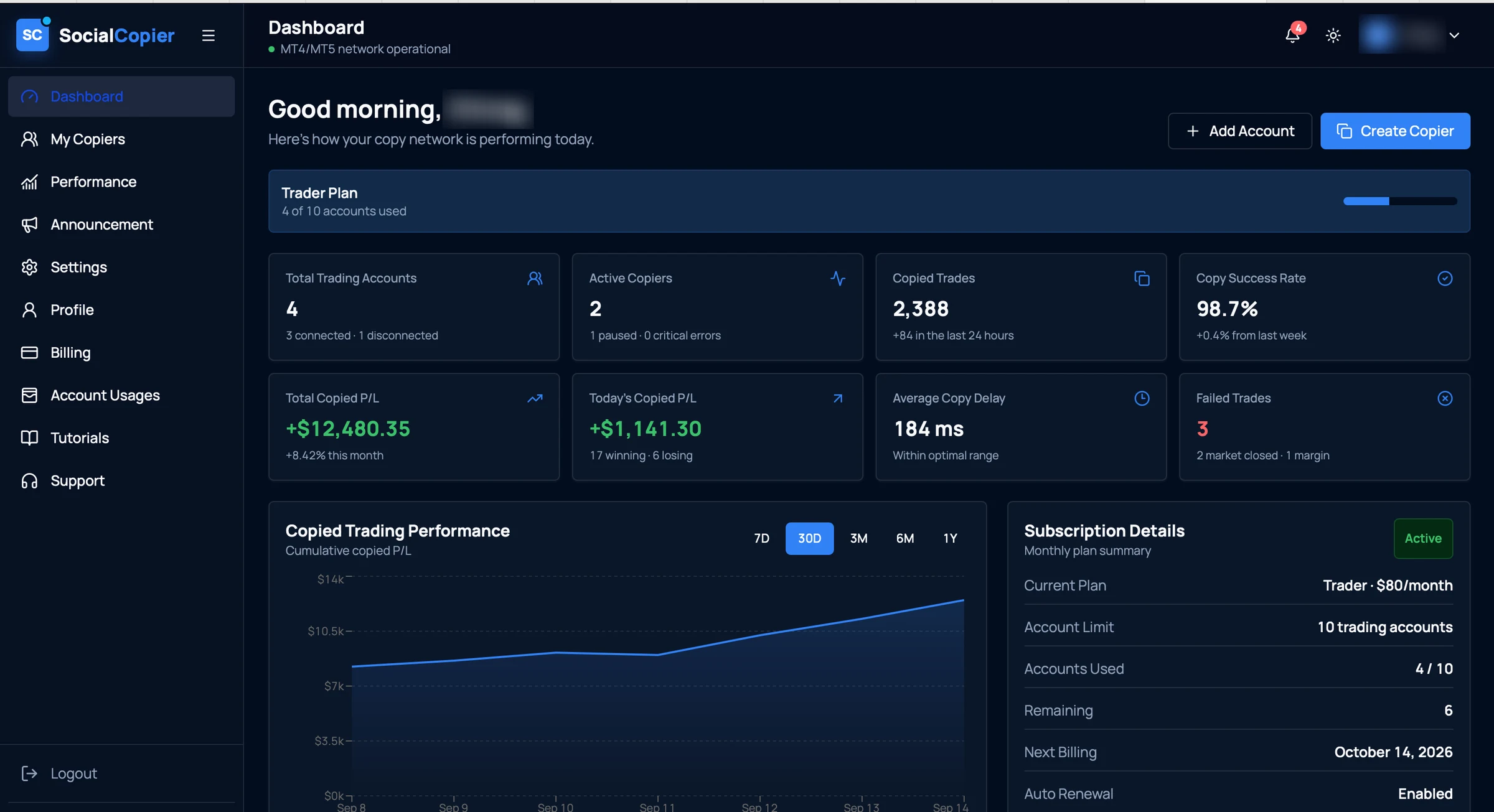
- 01Account capacityHow many of your plan's trading accounts are in use.
- 02Connected accountsEvery account you've added, and which of them are currently connected.
- 03Copy success rateThe share of copy attempts that completed, with the change on last week.
- 04Copied P/LTotal and same-day copied profit and loss, with winners against losers.
- 05Copy healthAverage copy delay and any trades that failed, with the reason.
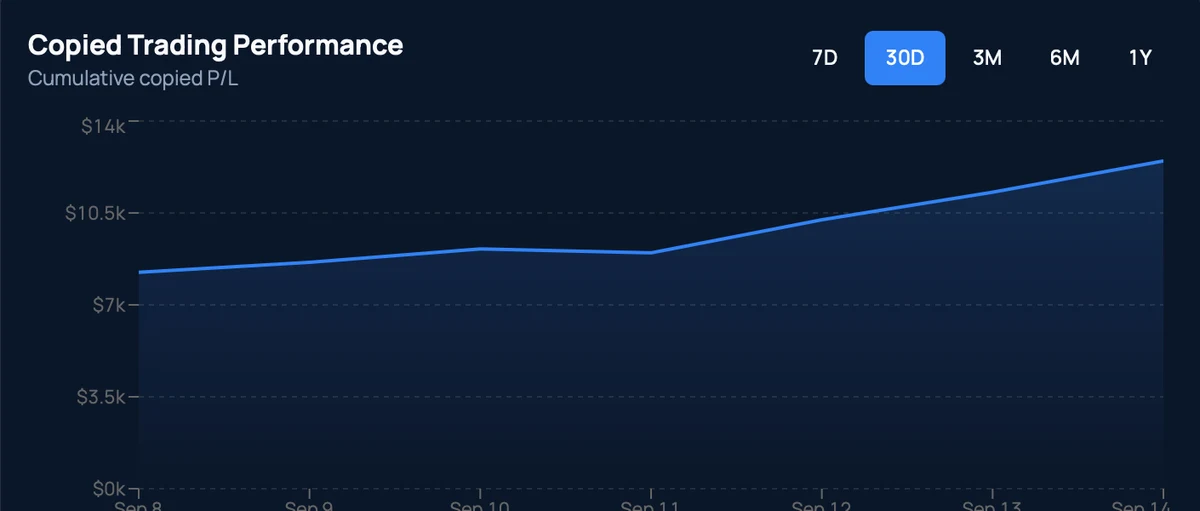
- 06Performance over timeCumulative copied P/L across 7 days to 1 year.
A real screen from the application. The account holder's name is blurred; figures are that account's own.
- Concept
Manage Accounts Independently
Accounts are managed from one workspace rather than one terminal each, across different brokers.
- MT5Account AConnected
- MT5Account BConnected
- MT5Account CConnected
- From the app
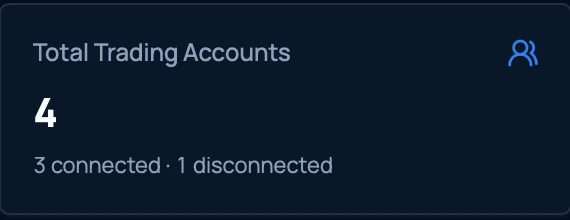
Everything at a Glance
How many accounts you have and how many are connected, without opening each one.
- Concept
Real-Time Open Trades
Review the positions currently open across your accounts in one list.
Open tradesLive- XAUUSDBUY0.50
- EURUSDSELL1.00
- GBPUSDBUY0.25
- From the app
Daily. Weekly. Monthly.
Switch the performance view between 7 days, 30 days, 3 months, 6 months and a year.
- From the app
Know Your Numbers Instantly
Total and same-day copied P/L, with how many positions won and how many lost.

- From the app
Watch Execution Health
Average copy delay and any failed trades, each with the reason it failed.

- Concept
Duplicate an Account
Reuse a configuration you've already set up instead of building it a second time.
Account AConfigurationDuplicateAccount A (Copy)Same configuration, new account - Concept
Start or Pause Accounts
Put an account on hold and start it again when you want it running.
Account statusACTIVEPause - Concept
Review Open and Closed Trades
Move between positions that are still running and ones that have finished.
Open tradesClosed trades- XAUUSD · BUY
- EURUSD · SELL
- Concept
Compare Accounts Side by Side
Put two accounts next to each other on the figures that matter to you.
FieldABEquity——Balance——P/L——Trades——
One Trade. Multiple Accounts.
Distribute trading activity from a lead account to connected follower accounts using configurable copying rules.
Control how trades are distributed. See what was copied. Monitor every copier relationship.
3 copiers across 4 accounts · 2 active · 1 paused
Monitor Equity. Define Your Rules. Stay Informed.
Monitor account equity and configure conditions that can trigger supported actions and notifications.
Three steps, once you’ve set it up
The diagrams below show how equity rules behave. They are illustrations of the design, not screens from the application.
Equity is watched against the levels you set.
A level you defined is reached: a target above, or a limit below.
A target is a level you choose. The monitor watches for it.
The response you configured for that rule runs.
- Alert only
- Alert + disable copier
- Alert + disable + close
Equity condition reached
Sent to your inbox with the account and the rule that fired.
- Concept
Equity Targets
Set a level you want an account to reach, and have the monitor watch for it.
Current equityTargetA target is a level you choose. The monitor watches for it.
- Concept
Drawdown Monitoring
Set a protective level below, so a falling account reaches a line you chose rather than one you didn't.
TargetProtection level - Concept
Automated Actions
When a condition is met the rule fires, and the response you picked for it runs.
- 1Condition reached
- 2Rule triggered
- 3Action taken
- Concept
Notifications
An email tells you which account it was and which rule fired, without you checking.
Equity condition reached
Sent to your inbox with the account and the rule that fired.
Know When It Matters.
You shouldn’t have to constantly check your platform to know what’s happening.
Receive timely email notifications for important events across your accounts, trades, and equity rules.
- Equity Alertjust now
Account Alpha has reached its configured equity threshold.
- Trade Copier2 min ago
Trade copied successfully to 3 follower accounts.
- Account Status18 min ago
Account connection requires attention.
- Risk Alert1 hr ago
Configured drawdown threshold has been reached.
Your Trading Operation Starts Here.
Stop managing every account manually.
Bring account management, trade copying, equity monitoring, performance visibility, and real-time alerts together in one powerful platform.